
Matterport Virtual Tour: How Does It Work and What Is It Used For?
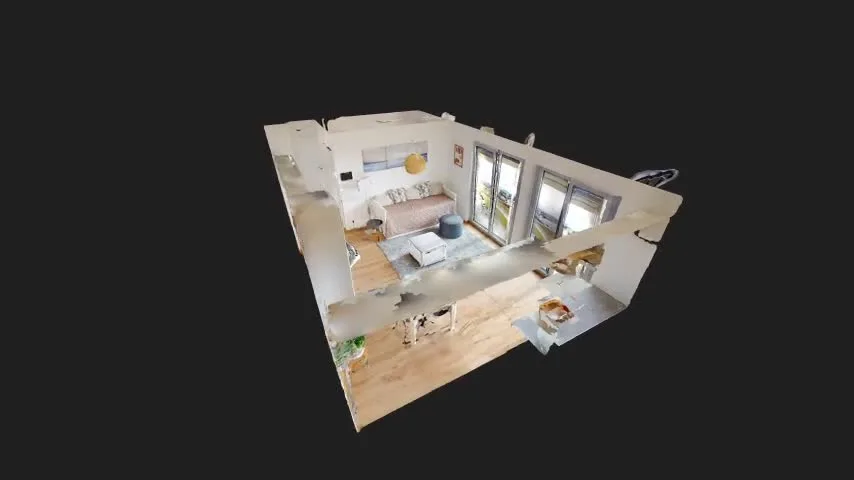
A virtual tour is no longer just a collection of panoramic photographs. With Matterport, a real space can be scanned to create an interactive 3D environment that can be explored from a computer, tablet or smartphone.
This technology makes it easier to understand the volumes, circulation and overall layout of a space remotely. It can be used to present a property, document a building, prepare a project or allow visitors to discover a site before going there in person.
But how does a Matterport virtual tour actually work? And, more importantly, what types of projects can truly benefit from it?
What is a Matterport virtual tour?
Matterport is a technology used to scan an existing space and create a navigable virtual representation of it. The result is more than a sequence of photographs: visitors can move virtually through the location and go from one area to another.
During the capture, the space is scanned from multiple positions throughout the building. These different viewpoints are then processed to reconstruct the environment and generate an immersive experience that can be accessed online.
One of Matterport’s most distinctive viewing modes is the “Dollhouse” view. It provides an overview of the entire building and makes it easier to understand how the different spaces are organised.
Explore a Matterport virtual tour
Click inside the tour below and move freely through the space.
Would you like to see more examples? Explore Mat4luX projects .
How is a Matterport virtual tour created?
Creating a virtual tour starts on site. Using a Matterport camera, the space is progressively captured from different positions to cover the areas that should be accessible in the final tour.
Preparing the site
Before the capture, we define the areas to be scanned. The goal is to determine the most useful route through the space and the areas that need to appear in the final tour.
Scanning the space
The camera is moved from one position to another throughout the building. Each scan progressively contributes to reconstructing the digital environment.
Creating the model
The captured data is processed and assembled to generate the 3D tour and the different viewing modes available within the Matterport environment.
Making the tour available
Once the tour is ready, it can be accessed through a web link or embedded directly into a website.
What can you do with a Matterport virtual tour?
One of Matterport’s main advantages is the freedom it gives visitors. Instead of viewing only the images selected by a photographer, they can choose their own route through the space.
Visitors can move from room to room and explore the scanned areas in their own way.
The relationship between rooms, circulation routes and the overall organisation of the building becomes much easier to understand.
The Dollhouse view provides a clear overview of the entire scanned environment.
The space remains accessible from a computer, tablet or smartphone without the need for a physical visit.
Depending on the tour configuration, measurement tools may be available directly within the digital environment. These measurements are indicative and do not replace a certified technical survey.
What is a Matterport virtual tour used for?
The same technology can serve very different purposes. It all depends on the type of building and how the tour will be used.
Present a property or space
In real estate, hospitality, retail or showrooms, a virtual tour allows prospective visitors or clients to discover a location before travelling there. It provides an understanding of the space that a photo gallery does not always convey.
Document a building
Matterport can also be used as a visual record of a site at a given point in time. Teams can return to this digital environment later without having to systematically revisit the location.
Support project teams
Architects, engineering firms, technical managers, facility managers and contractors can use the tour as a shared visual reference to better understand the environment in which a project will take place.
Prepare an intervention
Reviewing the site in advance can help teams understand access points, circulation routes and the overall layout before a technical intervention.
Matterport vs 360° photography: what is the difference?
Both 360° panoramic photography and a Matterport tour allow users to look around a space. However, they work differently and are suited to different uses.
Look around from a single point
A 360° photo is a spherical panoramic image. Visitors can look around from the exact point where the photograph was taken.
Move through a space
A Matterport tour connects multiple capture positions and allows users to navigate through the environment, including an overall 3D representation of the building.
Try an interactive 360° panoramic photo
Click and drag the image to look around the environment from the capture point.
What types of projects can use Matterport?
Matterport virtual tours can be used in many different environments whenever understanding or presenting a space is important.
- houses and apartments;
- offices and workspaces;
- retail spaces and showrooms;
- hotels and public-facing venues;
- industrial buildings and technical spaces;
- sites undergoing renovation or transformation;
- spaces that need to be reviewed remotely on a regular basis.
Creating a Matterport virtual tour in Luxembourg
Mat4luX provides Matterport virtual tours in Luxembourg for existing spaces and a wide range of professional and real-estate projects.
The on-site capture is carried out using a Matterport Pro2 camera. Once processing is complete, the tour can be accessed remotely and embedded into a website depending on the needs of the project.
Before any intervention, the floor area, layout, access conditions and purpose of the tour are reviewed to define the most appropriate service.
Matterport Virtual Tour FAQ
Do I need to install software to view a Matterport tour?
No. A Matterport tour can be viewed directly in a compatible web browser on a computer, tablet or smartphone.
Can a Matterport virtual tour be embedded on a website?
Yes. The tour can be embedded directly into a web page, allowing visitors to explore it without leaving the website.
Can measurements be taken within a Matterport tour?
Measurement tools may be available within the Matterport environment. The measurements should be considered indicative and do not replace a certified survey when contractual or regulatory accuracy is required.
How much does a Matterport virtual tour cost?
Pricing depends on factors such as floor area, site configuration, location and the deliverables required. Mat4luX currently offers Matterport services starting from €190 excl. VAT, with an indicative pricing reference starting from €2.30 excl. VAT/m². You can view Mat4luX pricing for the main pricing guidelines.
How long does it take to create a Matterport tour?
Capture time mainly depends on the floor area, the number of spaces to cover and the layout of the building. These factors are assessed before the on-site capture.
Would you like to create a Matterport virtual tour?
Tell us about your space and the purpose of your project. We will recommend the most suitable solution and service level.